|
How Will My Compiler Know the Address or Register
Assignments for My Soft Peripherals?
When you add a soft peripheral to your CSoC design,
FastChip can automatically allocate and assign addresses for each of the
memory-mapped registers in the peripheral and for your entire design.
FastChip’s Generate utility communicates this information to your compiler
using a text-based header file.
The following demonstrates how this is done.
 Whenever
you use a soft peripheral containing a memory-mapped register, you can
specify the symbolic address or name of the register. This is
the name conveyed to your compiler. In this example, a Command Register soft
peripheral is assigned the symbolic address MyRegister.
This same approach also works for custom modules imported from schematic
capture or logic synthesis. This example covers both the A7 and E5 CSoC
families. Whenever
you use a soft peripheral containing a memory-mapped register, you can
specify the symbolic address or name of the register. This is
the name conveyed to your compiler. In this example, a Command Register soft
peripheral is assigned the symbolic address MyRegister.
This same approach also works for custom modules imported from schematic
capture or logic synthesis. This example covers both the A7 and E5 CSoC
families.
Choose a Command Register module from the FastChip
library. Click the Properties tab and type MyRegister in the Symbolic Address text
box. Click OK.
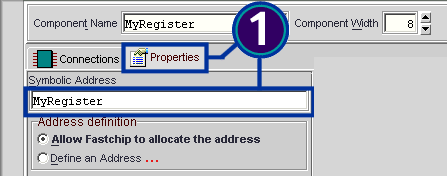
 Click
Generate in the FastChip toolbar. Click
Generate in the FastChip toolbar.
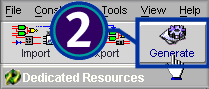
 The
Generate dialog box appears slightly differently, depending on whether you
use the E5 or A7 CSoC family. The name of the header is automatically named
after the project, although you can change the name and directory location. The
Generate dialog box appears slightly differently, depending on whether you
use the E5 or A7 CSoC family. The name of the header is automatically named
after the project, although you can change the name and directory location.
Check the option box to view the generated header file.
Click OK when finished.
E5 Family Example:
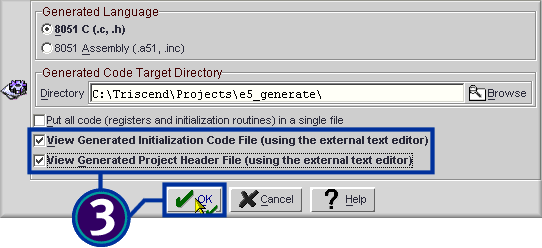
A7 Family Example:
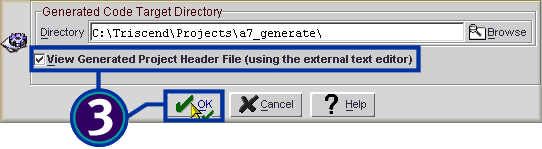
 The
register declaration appears in the resulting *.h header file. For the E5 family, the header
file is directly compatible with the Keil 8051 ‘C’ compiler, and is supported
by most other 8051 compilers. For the A7 family, the declarations should
work with any ANSI-C compiler. The
register declaration appears in the resulting *.h header file. For the E5 family, the header
file is directly compatible with the Keil 8051 ‘C’ compiler, and is supported
by most other 8051 compilers. For the A7 family, the declarations should
work with any ANSI-C compiler.
In both cases, there are compiler directives and macros
that define the Triscend register declarations.
E5 Family Example:
The register MyRegister
was automatically assigned to address 0xefff
by FastChip.
|
•
•
•
// ========= BEGIN SOFT MODULE
REGISTER DECLARATIONS ======
CHAR_XDATA (MyRegister,0xefff)
// ========== END SOFT MODULE REGISTER
DECLARATIONS =======
•
•
•
|
A7 Family Example:
The register MyRegister
was automatically assigned to address 0x100ffffc
by FastChip.
|
•
•
•
/* ======== BEGIN SOFT MODULE REGISTER DEFINITION ======= */
/* = You can use the following
register definition = */
/* = with the access macros defined
above. You can = */
/* = also type cast the register
definition yourself = */
/* = eg. to access a 4 bytes
register 'MyReg' = */
/* = as unsigned int ->
TWORD(MyReg)=102; = */
/* = as string ->
sprintf((char *)MyReg, "abc"); = */
/*
====================================================== */
#define MyRegisterA7 0x100ffffc /* size = 4
bytes */
/* ========= END SOFT MODULE REGISTER
DEFINITION ======== */
•
•
•
|
 Finally,
reference the header file using an include
statement in your ‘C’ source code. Once the registers are referenced, you
can compile your Triscend design just like any other ‘C’ application. Finally,
reference the header file using an include
statement in your ‘C’ source code. Once the registers are referenced, you
can compile your Triscend design just like any other ‘C’ application.
|
// Include the header file
automatically created by FastChip
#include "mydesign.h"
•
•
•
|
|
FastChip Version: 2.2.0
This solution may or may not apply to other versions
of the FastChip development system.
|
 ® ®
©
2001 by Triscend Corporation. All
rights reserved.
|